How to Locate UUIDs
You can find for the entity UUIDs in these locations:
- Exported SIMs File: The Export SIMs file includes all required UUID (Accounts, SIMs, Plans, products, Packages).
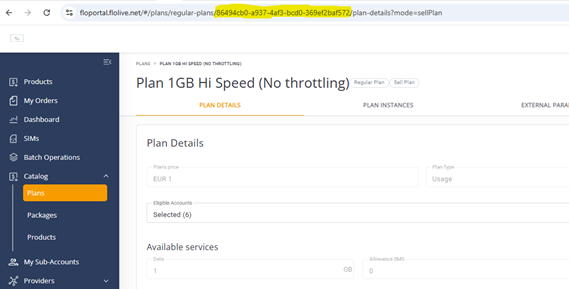
- Entity Details Page: When users navigate to an entity details page, the system encodes the entity UUID in the URL, enabling precise identification.
- Public API: For each entity type there is a relevant API to fetch the entity UUIDs.
Exported SIMs File
A description of the UUID columns displayed in the SIMs Export file is provided in this table.
| UUID | Description | Where to Find It |
|---|---|---|
| SIM UUID | Unique identifier for a SIM card in your account level. | Exported SIMs File: Refer to Column: “SIM UUID” |
| Child SIM UUID | Unique identifier for a SIM in your sub account level. | Exported SIMs File: Refer to Column: “Child Sim UUID” |
| Sub Account UUID | Unique identifier of the Sub account | Exported SIMs File: |
| Plan UUID / Product Plan UUID | Unique identifier for a generic plan. | Public API |
| SIM Plan UUID Instance | Unique identifier for an instance of a plan assigned to a SIM. (Applicable for both Sell and Buy Plan) | Exported SIMs File. |
| Product UUID | Unique identifier for a Product. | Public API |
| Product Package UUID | A unique identifier for a generic package. (Applicable for both Sell and Buy Package). | Public API |
An example of the SIM and Account UUIDs is shown here.

An example of the Sell and Buy Plan UUIDs is shown here.

Entity Details Page
When users navigate to an Entity Details page, such as a page for viewing a specific plan or sub-account, the system encodes the unique identifier (UUID) of that entity within the URL in the address bar. This approach allows the system to easily identify which entity's details to display and ensures the correct data loads.
An example of the Plan Catalog UUID displayed as part of the URL is shown here.